Professional designers do not jump straight into colours and polish. They move from rough to detailed, testing ideas cheaply before investing time.
Three levels of fidelity
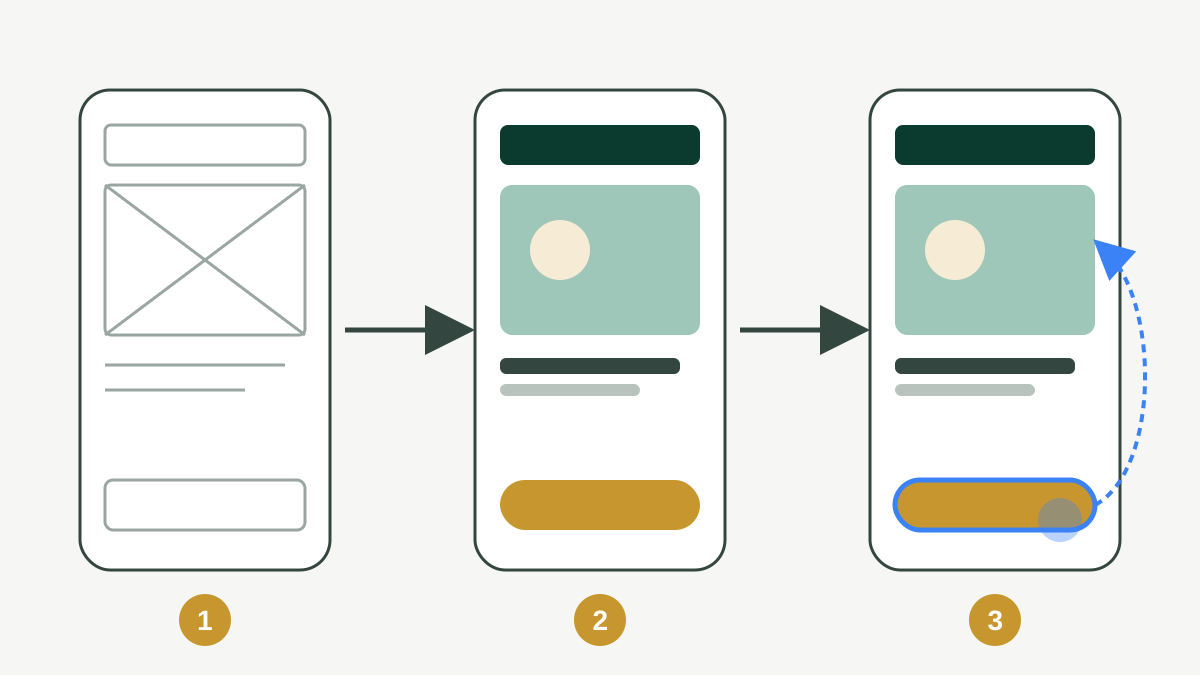
- Wireframe (low fidelity): shows structure: what goes where, which content and actions each screen needs. Quick to draw and quick to change. Use grey boxes and simple lines; no colours yet.
- Mockup (high fidelity): the final look: brand colours, fonts, real images and text, exact spacing.
- Prototype: the mockups (or even wireframes) connected with interactions, so people can click through and test the experience.
Showing a client wireframes first saves time: it is much easier to move a box than to redesign a finished screen.
The design cycle
Design is a loop, not a straight line:
- UnderstandUsers, business goals and constraints
- SketchPaper sketches or quick wireframes of several ideas
- DesignTurn the best idea into mockups
- PrototypeLink screens so the idea can be tried
- TestWatch real people use it and note problems
Simple usability testing
You can test with five people and learn most of the big problems:
- Give each person a realistic task: "Reorder your last grocery order."
- Ask them to think aloud while using the prototype.
- Do not help or explain. Note where they hesitate, tap the wrong thing or give up.
- Fix the biggest problems first, then test again.
Use real content
Design with realistic text, names, prices and images early. "Lorem ipsum" hides problems: a real product name may be three times longer than the placeholder, and Urdu or Arabic text needs more height and right-to-left layouts. If you design for several languages, check every important screen in each one.
Mobile first
Most users in Pakistan and the Arab world browse on phones. Design the phone screen first, then expand to tablet and desktop. Starting small forces you to keep only what matters.
Practice task (30 min)
- Sketch three different layouts for the home screen of your app on paper.
- Turn the best one into a grey wireframe in Figma using real text.
- Show it to one person, ask them to find the main action, and note what confused them.
Sign in or create a free account to save your progress and take the tests. Sign in